Online calculators along with quizzes and assessments are very effective lead magnets but they are also excellent tools to help you provide personalized, actionable advice to your clients.
Whether you’re a coach, consultant, or business leader, helping your clients achieve better results starts with delivering tailored insights based on their unique needs.
Now you can create online calculators right and embed them inside your Evalinator assessments! That helps you create even more impactful assessments and quizzes because the calculators scores can be become integral to your overall scoring.
An online calculator allows you to instantly calculate key metrics, helping your clients make informed decisions quickly and easily.
Common uses for online calculators include:
They won’t replace a comprehensive spreadsheet of course, but they give you a great way to start the engagement.
Integrating a calculator into your assessment is simple and seamless. Here’s how you can get started:
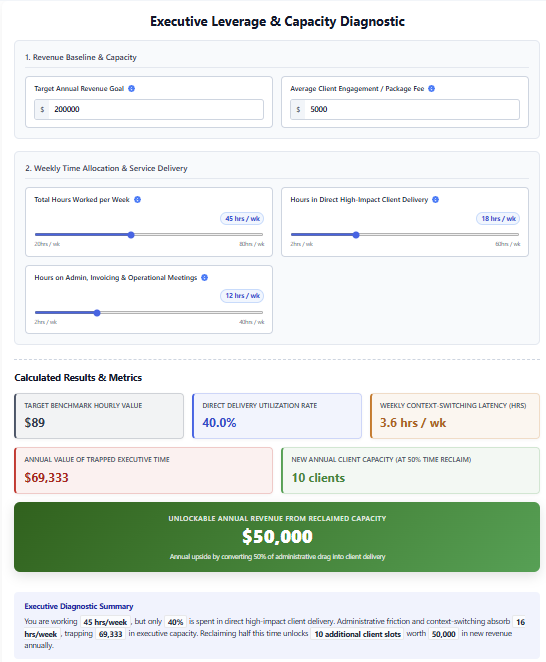
By adding a calculator to your assessments, you not only help clients quickly understand their situation, but you also add an extra layer of insight that can inform decision-making.
This tool is perfect for coaches and consultants who want to provide a more precise diagnosis and create a personalized action plan for their clients.
Adding a calculator page integrates smoothly into your current workflow. You can continue capturing key information like emails, names, and other profile data, and still offer assessments that include actionable, personalized feedback.
This creates an interesting diagnostic experience:
Collect the information → calculate the result → complete the assessment → reveal the findings.
This can be particularly useful when you want the calculator to be part of a larger assessment or lead-generation experience.
The calculator result is saved along with the assessment responses and can be used when presenting the client’s overall findings.
For example, suppose a calculator determines that a company’s gross margin is 50%.
The calculator result remains:
Gross Margin: 50%
But you can specify that 80% represents the maximum score for assessment purposes.
Evalinator automatically normalizes the result to the assessment’s standard 0–10 scale:
50 ÷ 80 × 10 = 6.25 / 10
The client still sees the meaningful business result of 50%, while the assessment receives a standardized 6.25/10 score.
This allows calculator questions to contribute to:
The calculator therefore doesn’t just provide information—it can become a genuine component of the diagnostic model.
Not every metric works the same way.
For some calculations, a higher value indicates a better result. For others, a lower value is better.
For example:
When using a calculator result as an assessment score, you can specify the scoring direction.
This keeps the calculator result meaningful while allowing it to work seamlessly with the rest of the assessment.
The addition of a calculator enhances the value your assessments provide, helping you establish your authority while offering something useful and practical to your clients.
Start from scratch, customize a ready-made template, or describe what you want and let AI generate a working calculator for you.
This feature helps you stand out, offering a richer experience that goes beyond basic quizzes. It gives you the ability to provide tailored, actionable advice based on real-time data. And with customizable results, you can ensure that the feedback aligns with your clients’ unique needs and goals.
We’re excited to see how you use this new feature and encourage you to share your feedback to help us continue improving.
Ready to give it a try? Access your 14 day free trial here.

Feeling frustrated with lead generation?
Take this free, 5-minute quiz and get more prospects into your leads funnel.
Instant Results. Actionable recommendations. Email required.
Find Your Score >>