Here’s how to scale your coaching and consultant frameworks by turning them into controlled templates that others can use without altering your core IP.
Every experienced coach or consultant eventually reaches a familiar point.
You’ve built a methodology that works. Your assessments capture years of thinking, experimentation, and refinement. Clients trust your insights because they’re grounded in a structured framework, not intuition alone. Results are consistent, and your reputation grows (see how to build your expert authority).
Then new opportunities start appearing.
Other experts want to learn your approach.
This is where scaling becomes complicated.
If you share your assessment freely, you risk losing control of your intellectual property. If you keep everything locked, your impact — and your business — remain limited by your own time and capacity. Many experts try to solve this with PDFs, spreadsheets, or custom agreements, but those solutions rarely scale well and often dilute the brand.
This is exactly the problem Evalinator’s new “Expert Templates” feature is designed to solve – scale your coaching and consulting frameworks!
At its core, this feature allows you to turn your assessments into controlled templates that others can use without accessing or altering your core IP. Your questions, scoring logic, dimensions, and methodology remain locked, while approved users can customize the look and feel and apply the assessment with their own clients.
This opens up entirely new ways of working.
For franchising or licensing models, this is crucial. As a consultant or coach, when you license your programs to others — whether as franchises, affiliates, or licensed practitioners — consistency is everything. Evalinator templates make it possible to distribute your methodology at scale while maintaining quality control and brand integrity.
Beyond scalability, there are clear business benefits.
The process is intentionally simple.
First, make sure you have an assessment that represents your framework. This could be an onboarding assessment, a current-state diagnostic, a progress measurement tool, a personality or behavioral assessment, or a “Wheel of Life” adapted to your methodology.
Whether it’s scored or descriptive, the key is that it reflects your intellectual property.
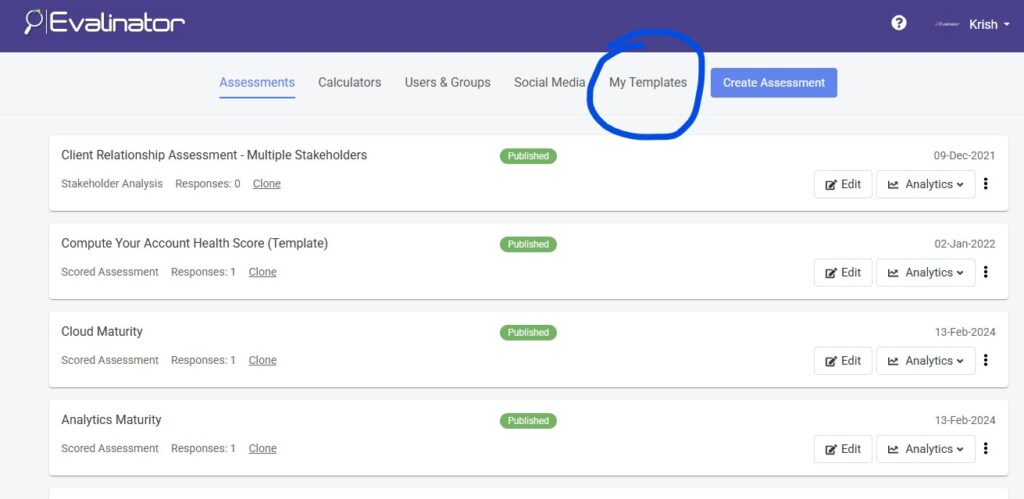
Step 2:
Next, go to the “My Templates” section in Evalinator and designate your assessment as a template. At this point, Evalinator locks the core structure of your assessment while preparing it for controlled sharing.
It also allows for seamless changes. For example, if you later want to make changes to how a question is worded, it automatically reflects everywhere.
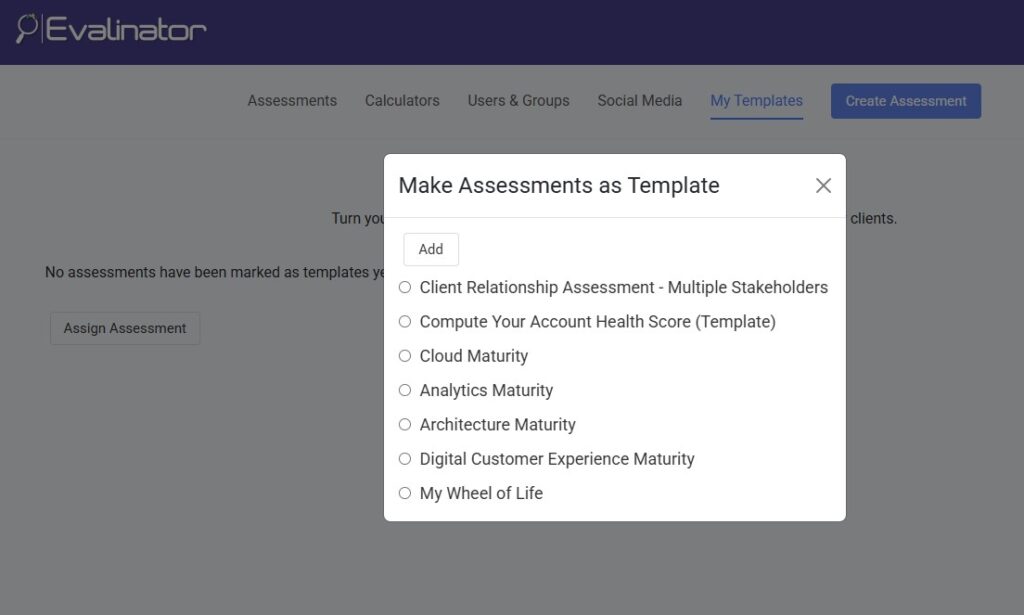
Step 3:
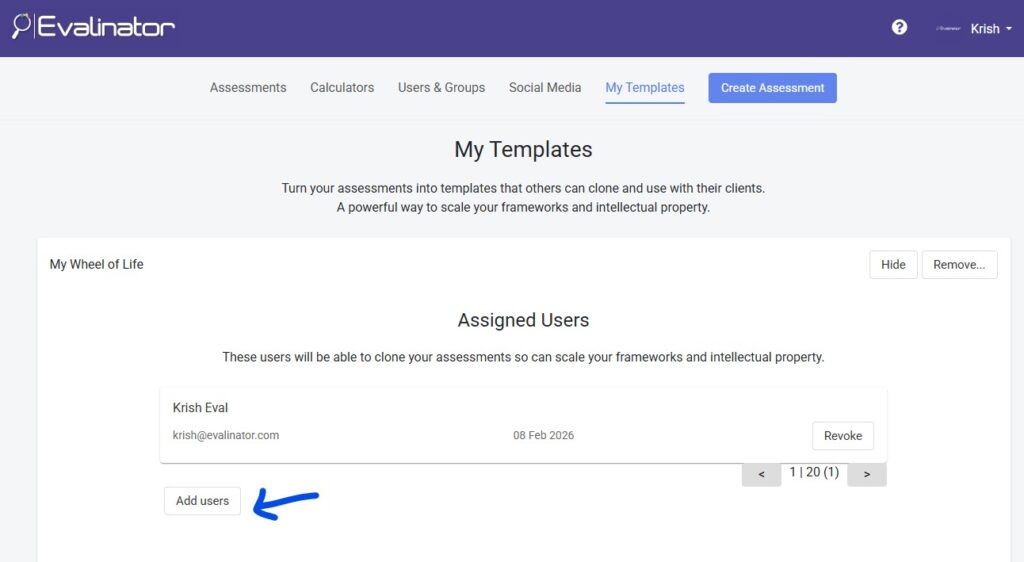
Next, add the users who are allowed to use this template. Typically, these are people who have gone through your training, certification, or onboarding process — junior coaches, partner consultants, franchisees, or licensed practitioners.
That’s it!
Once you do this, your assessment automatically appears as a template for those users. They can clone it, customize the look and feel, and use it with their own clients, while your core framework remains protected.
If you ever change your mind, you can revoke access at any time. Assessments already created by users will remain, but no new ones can be created from your template. This gives you full control without disrupting existing work.
Most experts think about scaling in terms of more clients, more sessions, or more content.
Evalinator allows you to scale your coaching and consulting frameworks without losing quality or control.
If you’re a coach, consultant, or expert who wants to generate more leads, retain clients more effectively, and build a recognizable, scalable brand around your methodology, now is the time to explore how Evalinator can help templatize your approach.
Sign up for Evalinator and take advantage of the risk-free, 2 week trial.
Feeling frustrated with lead generation?
Take this free, 5-minute quiz and get more prospects into your leads funnel.
Instant Results. Actionable recommendations. Email required.
Find Your Score >>